
Showing posts with label Microcontrollers. Show all posts
Showing posts with label Microcontrollers. Show all posts
Tuesday, March 27, 2012
PIC based GLCD development kit
Raj from Embedded Lab reviews the PIC based Graphical LCD development kit from iCircuit technologies. This GLCD development kit includes a 28-pin PIC development board, a 128×64 GLCD module (KS0108 controller chip), a GLCD adapter board, two 10-pin IDC ribbon cables, and a blank prototyping board.


Friday, January 20, 2012
Reading multiple switches from one I/O pin
Normally one input switch requires one digital input pin of a microcontroller. Use of keypad style multiplexing saves some input pins while interfacing an array of switches. There exist another technique based on ADC channel that allows to connect multiple switches on a single input pin of a microcontroller. This tutorial from Embedded Lab demonstrates this as applied to PIC12F683 microcontroller.


DHT11 sensor protocol and its interface with PIC microcontroller
DHT11 is the most inexpensive calibrated digital sensor currently available in the market for measuring relative humidity and temperature together. However, it has got its own proprietary 1-wire protocol which makes it little challenging to interface with microcontrollers. Raj from Embedded Lab shows how to implement this protocol in the firmware of PIC microcontroller so that the temperature and relative humidity information can be retrieved from the sensor.


Thursday, September 30, 2010
Dual Scale Digital Room Thermometer using PIC Microchip

Monday, September 27, 2010
3-wire Serial LCD for PIC12F Series Microcontrollers

Low pin-count microcontrollers like PIC12F series don't have enough I/O ports to directly drive a seven segment or character LCD display. However, it can be done with the use of a serial-in-parallel-out shift register. The idea is to first transfer the character data or LCD command serially from the microcontroller to the shift register, and when it is ready at the parallel output of the shift register, send an Enable signal to the LCD module to accept it. Of course LCD pins are connected at the parallel output of the shift register. The circuit below shows how to use a 74HC595 shift register for this purpose.
Tuesday, September 21, 2010
Cheap Microcontroller Programmers for Students and Hobbyists
Few years ago, microcontroller programmers and development boards were quite expensive to afford for students and hobbyists. Besides they were not easily available everywhere.When I was in school, we had two AT89C51 programmers in our whole department of electrical engineering and we had to get permission to use them. Things have been changed since then, and now you can buy one for less than $20 online that could fulfill a student's or hobbyists' need.
I am writing this article with the intention to show some cheap microcontroller programmers that you can buy online. The most popular microcontrollers among hobbyists and students are PIC (from Microchip) and AVR (from Atmel). For PIC, people usually recommend to buy Microchip's PICkit because the programming software is maintained by Microchip itself, and the software also provides debugging feature. But the disadvantage is it is little bit expensive for beginners. I don't have PICkit, I bought a third party programmer, it works great. And if you are going to use high level compiler for programming, debugging is rarely used for beginner's level project. But I would definitely recommend one thing: buy USB programmer and not serial or parallel type, because the later two are outdated and modern laptops (and may be computers) don't have them.
AVR Programmers
1. Pololu USB AVR Programmer: The Pololu USB AVR Programmer is an extremely compact, low-cost in-system programmer (ISP) for Atmel’s AVR mirocontrollers. The USB AVR programmer connects to your computer’s USB port via an included USB A to mini-B cable and communicates with your programming software, such as AVR Studio or AVRDUDE, through a virtual COM port using the AVRISPV2/STK500 protocol. The programmer connects to your target device via an included 6-pin ISP programming cable.The programmer is powered by the 5V USB power bus, and it is intended for programming AVRs that are running at close to 5 V (note that the programmer does not deliver power to the target device).

I am writing this article with the intention to show some cheap microcontroller programmers that you can buy online. The most popular microcontrollers among hobbyists and students are PIC (from Microchip) and AVR (from Atmel). For PIC, people usually recommend to buy Microchip's PICkit because the programming software is maintained by Microchip itself, and the software also provides debugging feature. But the disadvantage is it is little bit expensive for beginners. I don't have PICkit, I bought a third party programmer, it works great. And if you are going to use high level compiler for programming, debugging is rarely used for beginner's level project. But I would definitely recommend one thing: buy USB programmer and not serial or parallel type, because the later two are outdated and modern laptops (and may be computers) don't have them.
AVR Programmers
1. Pololu USB AVR Programmer: The Pololu USB AVR Programmer is an extremely compact, low-cost in-system programmer (ISP) for Atmel’s AVR mirocontrollers. The USB AVR programmer connects to your computer’s USB port via an included USB A to mini-B cable and communicates with your programming software, such as AVR Studio or AVRDUDE, through a virtual COM port using the AVRISPV2/STK500 protocol. The programmer connects to your target device via an included 6-pin ISP programming cable.The programmer is powered by the 5V USB power bus, and it is intended for programming AVRs that are running at close to 5 V (note that the programmer does not deliver power to the target device).

Cost: $19.95 Buy it here: http://www.pololu.com/catalog/product/1300
Friday, August 27, 2010
A Versatile Temperature Data Logger using PIC12F683 and DS1820
PIC12F683 is just a 8-pin microcontroller, but it is enough to log 254 temperature readings from DS1820 sensor in its inteernal EEPROM. Here's a tiny temperature data logger built with a PIC12F683 and DS1820. It has Start, Stop, and Send switch buttons for controlling various operations. The sampling interval is selectable to 1 sec, 1 min, or 10 min. The logged values can be sent to a PC through serial port.


Monday, August 23, 2010
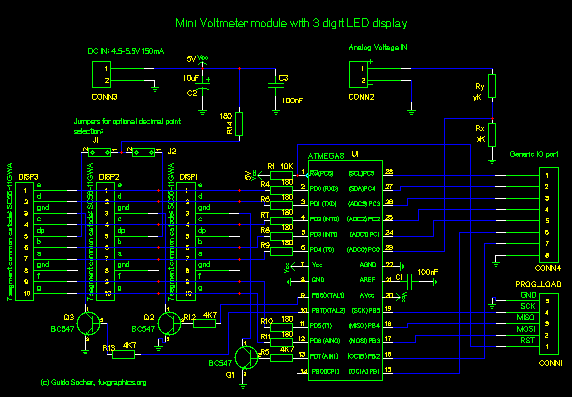
DIY: A 3-Digit Digital Voltmeter (Atmega8)
Here's a simple digital voltmeter based on Atmega8 microcontroller. It uses the in-built A/D converter to measure the input analog voltage and displays it on a 3-digit seven segment LED display.


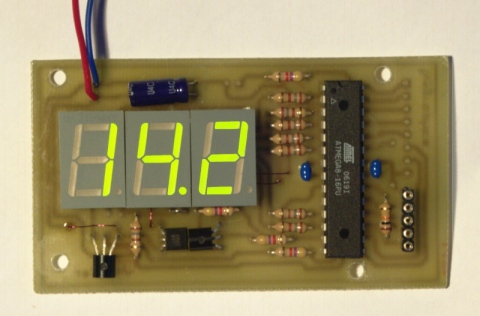
Source: http://tuxgraphics.org/electronics/200706/mini-digital-voltmeter.shtml
Monday, August 2, 2010
Make Your Own USB Device using PIC18F4550
If you are looking to learn how to make your own USB device, this tutorial is perfect to start. Here you will see how to breadboard a simple USB generic HID device, creating the PIC18F firmware and finally creating the Windows interface for the device which will allow you to control a LED from the PC and read the state of a push-button from the device. Using the built in drivers for generic HID devices provides a simple method of creating Windows and Linux compatible devices and also makes the creation of both firmware and software far simpler. Since the HID standard does not require custom drivers you will not need to get a certificate for your driver, also both Windows and Linux have built-in libraries to help you communicate.

This project will allow you to control a LED from Windows and also see the status of a push-switch on the device. Using this the basic principals of 2-way USB communication will be made clear allowing you to progress onto more complex projects. The circuit is made on a breadboard and the PIC18F firmware will be based on (the freely available) MPLAB and Hitech C compiler, the Windows software will be created using Microsoft Visual C++ 2008 express (which is also free to download).

This project will allow you to control a LED from Windows and also see the status of a push-switch on the device. Using this the basic principals of 2-way USB communication will be made clear allowing you to progress onto more complex projects. The circuit is made on a breadboard and the PIC18F firmware will be based on (the freely available) MPLAB and Hitech C compiler, the Windows software will be created using Microsoft Visual C++ 2008 express (which is also free to download).
Friday, July 30, 2010
MSP430 LaunchPad: Cheapest Microcontroller Development Tool from TI

Source : http://processors.wiki.ti.com/index.php/MSP430_LaunchPad_(MSP-EXP430G2)
What is LaunchPad?
LaunchPad is an easy-to-use development tool intended for beginners and experienced users alike for creating microcontroller-based applications. At $4.30, the LaunchPad offers everything you need to get started with your projects.
The LaunchPad development kit is a part of the MSP430 Value Line series. LaunchPad has an integrated DIP target socket that supports up to 20 pins, allowing MSP430 Value Line devices to be dropped into the LaunchPad board. Also, an on-board flash emulation tool allows direct interface to a PC for easy programming, debugging, and evaluation. Included are free and downloadable software development environments for writing and debugging software. LaunchPad can be used to create interactive solutions thanks to its on-board push buttons, LEDs, and extra input/output pins for easy integration of external devices.
Why LaunchPad?
The LaunchPad is an easy-to-use, affordable, and scalable introduction to the world of microcontrollers and the MSP430 family.
Easy-to-use – LaunchPad includes all of the hardware and software needed to get started. Open source projects and code examples help users get up and running quickly.
Affordable – For $4.30, the LaunchPad includes a development board, 2 programmable MSP430 microcontrollers, mini-USB cable, PCB connectors for expandability, external crystal for increased clock accuracy, and free & downloadable software integrated development environments (IDEs) – everything you need to get started today.
Scalable – The LaunchPad is a simple introduction to the MSP430 microcontroller family. As application requirements change, programs developed on the LaunchPad can be migrated to higher end MSP430 devices.

AT89C2051 based Line Follower ROBOT
A Line following robot is the most popular beginner's choice in the world of robotics. Here is one that is controlled by a AT89C2051 microcontroller. It uses two motors that control the two rear wheels and the front wheel is free. The four infrared sensors detects a black track on floor that helps the ROBOT to follow it. LM324 IC (H-bridge driver) is used to compare the voltages from the IR sensors and L293D is used to drive the motors.


Source: http://www.kmitl.ac.th/~kswichit/LFrobot/P4.jpg
Thursday, July 29, 2010
Analog Multimeter Clock using PIC16F628A
This analog clock is something I have never thought about. It consists of three analog multimeters (for Hour, Minutes, Seconds displays) that are all in 0.5mA DC mode. The -ve ends are grounded and the +ve terminals are connected to a PIC16F628A microcontroller that keeps track of time and outputs a calculated current to each meter to display the current time.

With the use of three switch buttons, a user can set the time. The controller uses PWM (pulse width modulation) to pulse the current to the 3 meters which allows for precise needle position. The firmware was written in PICBasic Pro and there is still about 20% of the 2K PIC code space still available.
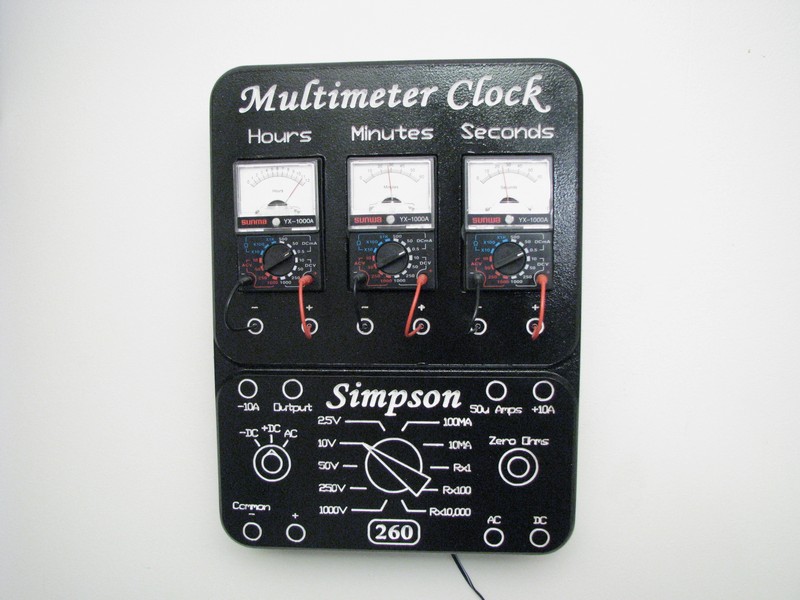
Source: http://alan-parekh.com/projects/multimeter-clock-simpson-260/
With the use of three switch buttons, a user can set the time. The controller uses PWM (pulse width modulation) to pulse the current to the 3 meters which allows for precise needle position. The firmware was written in PICBasic Pro and there is still about 20% of the 2K PIC code space still available.
Wednesday, July 28, 2010
ATtiny45 Based PC Oscilloscope
Oscilloscopes are expensive but you can make this one for less than $10. This USB scope is based on ATtiny45 (8-pin microcontroller from Atmel). It has 2 analog inputs. The firmware in the Tiny45 is written in C and is compiled with Winavr and usb source code from obdev. As you can see, there is no crystal, the software sync the internal 16.5Mhz pll clock with the USB clock.


Source: http://yveslebrac.blogspot.com/2008/10/cheapest-dual-trace-scope-in-galaxy.html
Tuesday, July 27, 2010
Make an Oscilloscope out of your Old B/W TV
Oscilloscopes are very versatile pieces of electronic test equipment that are used in a wide variety of applications. But they are expensive and most of the time students or hobbyists could not afford them. Here is an oscilloscope that you can make yourself with a black and white television. This oscilloscope has 20KHz bandwidth.
This project relies on sampling a waveform and then reconstructing it. The Shannon sampling theorem, which states that samples must be taken at a rate greater than twice the maximum frequency of the original signal (or at the Nyquist rate), is used so that no aliasing occurs. Aliasing occurs when a signal gets undersampled; a waveform of lower frequency will get reconstructed instead of the correct higher frequency signal. A picture is shown below to illustrate the idea:

Therefore, in this project, the sampling rate is always set higher than 40 kHz (the oscilloscope functions correctly at a maximum frequency of 20 kHz). The A-to-D converter is responsible for sampling and has a maximum sampling rate of 2 megasamples/sec.

Read details of this project @ Digital Oscilloscope
This project relies on sampling a waveform and then reconstructing it. The Shannon sampling theorem, which states that samples must be taken at a rate greater than twice the maximum frequency of the original signal (or at the Nyquist rate), is used so that no aliasing occurs. Aliasing occurs when a signal gets undersampled; a waveform of lower frequency will get reconstructed instead of the correct higher frequency signal. A picture is shown below to illustrate the idea:

Source: http://instruct1.cit.cornell.edu/courses/ee476/FinalProjects/s2010/egm23_lad97_rsw35/egm23_lad97_rsw35_website/egm23_rsw35_lad97_final_project_v2_files/image004.jpg
Therefore, in this project, the sampling rate is always set higher than 40 kHz (the oscilloscope functions correctly at a maximum frequency of 20 kHz). The A-to-D converter is responsible for sampling and has a maximum sampling rate of 2 megasamples/sec.

Read details of this project @ Digital Oscilloscope
Monday, July 26, 2010
A Temperature Data Logger using PIC12F683 and EEPROM
Data loggers are electronic devices that record data over time with a built in instrument and a sensor. They are generally small, battery powered, portable, and equipped with a microprocessor, internal memory for data storage, and sensors.The data logger we are talking about records temperature of a given place over time. This project uses a 8-pin PIC12F683 Microchip along with a serial EEPROM and a thermistor (temperature sensor).
The temperature is measured and stored at user programmable intervals; this can be from 1 second to 256 seconds. The time interval is set by programming it and the start time into the EEPROM. Since most of the time the PIC stays in sleeping mode, this consumes very less power. With a EEPROM of 32KB, it is possible to record 32,000 measurements. This could be one measurement every 1 minute for 22 days for example.

The temperature is measured and stored at user programmable intervals; this can be from 1 second to 256 seconds. The time interval is set by programming it and the start time into the EEPROM. Since most of the time the PIC stays in sleeping mode, this consumes very less power. With a EEPROM of 32KB, it is possible to record 32,000 measurements. This could be one measurement every 1 minute for 22 days for example.
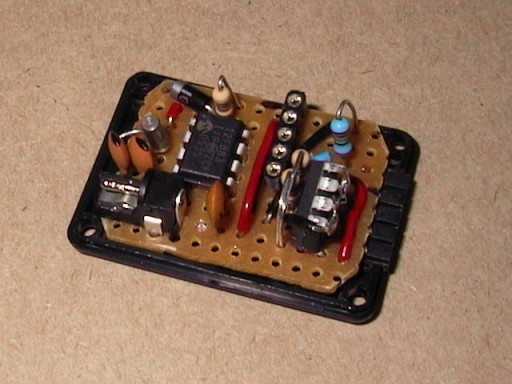
Source: http://www.gedanken.org.uk/electronics/temperature-recorder/pcb-v1.jpg
Sunday, July 25, 2010
A Robotic Arm Controlled by a PC Mouse
Look at this pretty neat robotic arm that can be controlled with a standard USB mouse. In this project, a Lynxmotion robotic arm is used with a wrist upgrade, an Arduino as the brain, a USB Host shield in order to interface a regular computer mouse, and a custom made servo motor controller.


Demo video
Microcontroller-Based Water Level Indicator
This project is useful for those who have a big water storage tank on the rooftop and use a powered motor to fill it with ground water. This circuit will indicate you when the tank is about to full. It uses a PIC12F683 microcontroller as a controller and copper probes to sense the water level.
The circuit operates on 4.5V (3 AA batteries) and the PIC controller works in sleeping mode that extends the battery life.

The circuit operates on 4.5V (3 AA batteries) and the PIC controller works in sleeping mode that extends the battery life.

Source:http://www.bobhobby.com/2008/01/27/water-level-detector-with-pic12f683/
Saturday, July 24, 2010
Interface a HD44780 Character LCD with a PIC Microcontroller
Introduction
An HD44780 Character LCD is a liquid crystal display (LCD) display device designed for interfacing with embedded systems. These screens come in a variety of configurations including 8x1, which is one row of eight characters, 16x2, and 20x4. The most commonly manufactured configuration is 40x4 characters, which requires two individually addressable HD44780 controllers with expansion chips as the HD44780 can only address up to 80 characters.
These LCD screens are limited to text only and are often used in copiers, fax machines, laser printers, industrial test equipment, networking equipment such as routers and storage devices. Character LCDs can come with or without backlights, which may be LED, fluorescent, or electroluminescent. Character LCDs use a standard 14-pin interface and those with backlights have 16 pins. The pinouts are shown in figure below.
An HD44780 Character LCD is a liquid crystal display (LCD) display device designed for interfacing with embedded systems. These screens come in a variety of configurations including 8x1, which is one row of eight characters, 16x2, and 20x4. The most commonly manufactured configuration is 40x4 characters, which requires two individually addressable HD44780 controllers with expansion chips as the HD44780 can only address up to 80 characters.
These LCD screens are limited to text only and are often used in copiers, fax machines, laser printers, industrial test equipment, networking equipment such as routers and storage devices. Character LCDs can come with or without backlights, which may be LED, fluorescent, or electroluminescent. Character LCDs use a standard 14-pin interface and those with backlights have 16 pins. The pinouts are shown in figure below.
Subscribe to:
Posts (Atom)